For millions of PC gamers who prefer a couch-and-controller setup—whether through Valve’s revolutionary handheld, the Steam Deck, or a living room rig running Steam’s Big Picture Mode—the user interface is about to undergo a dramatic visual evolution. Valve has officially launched a brand-new Steam client beta that introduces a heavily requested aesthetic overhaul dubbed “Big Art Mode.” Alongside this striking visual refresh comes a nostalgia-inducing screensaver feature, alongside a suite of under-the-hood performance enhancements designed to streamline startup times and optimize Windows and Linux ecosystems alike.
While the update is currently confined to the beta branch, it signals a major shift in how Valve approaches user interface (UI) design for large-format displays. By prioritizing high-impact artwork over dense, information-heavy carousels, the company is aiming to make the PC gaming experience feel less like a traditional desktop operating system and more like a dedicated, premium console environment.
Main Facts: What’s New in the Latest Steam Beta?
The newly released Steam client beta packs several noteworthy additions, but the spotlight firmly belongs to the interface upgrades:
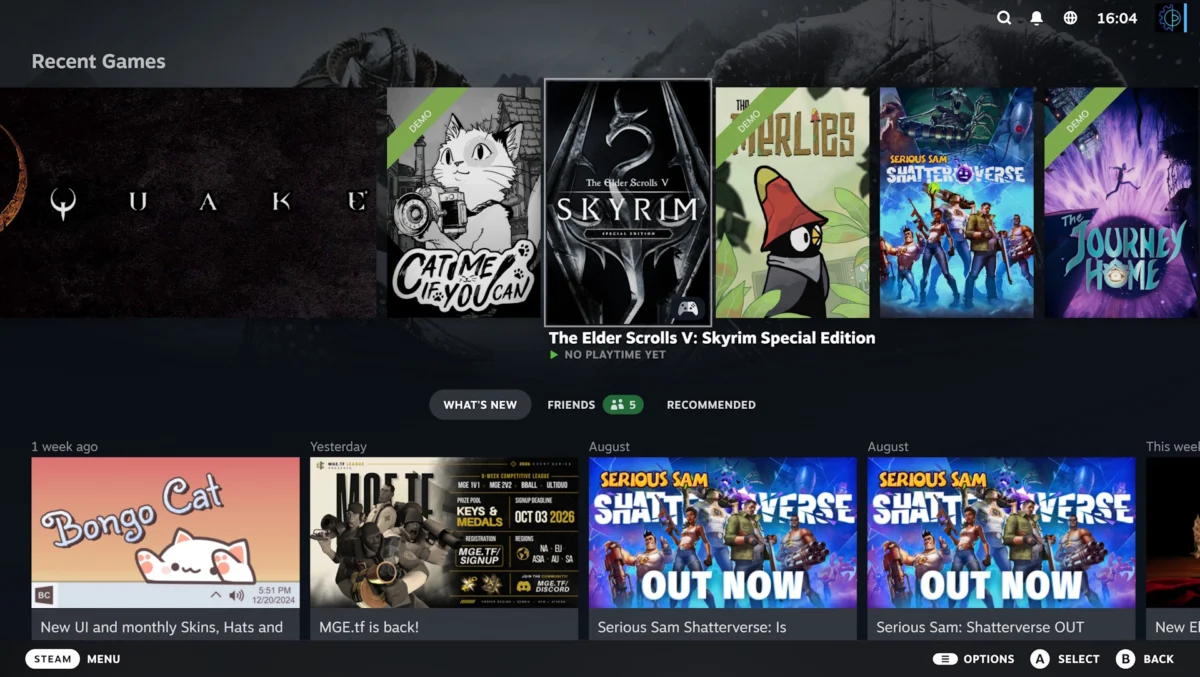
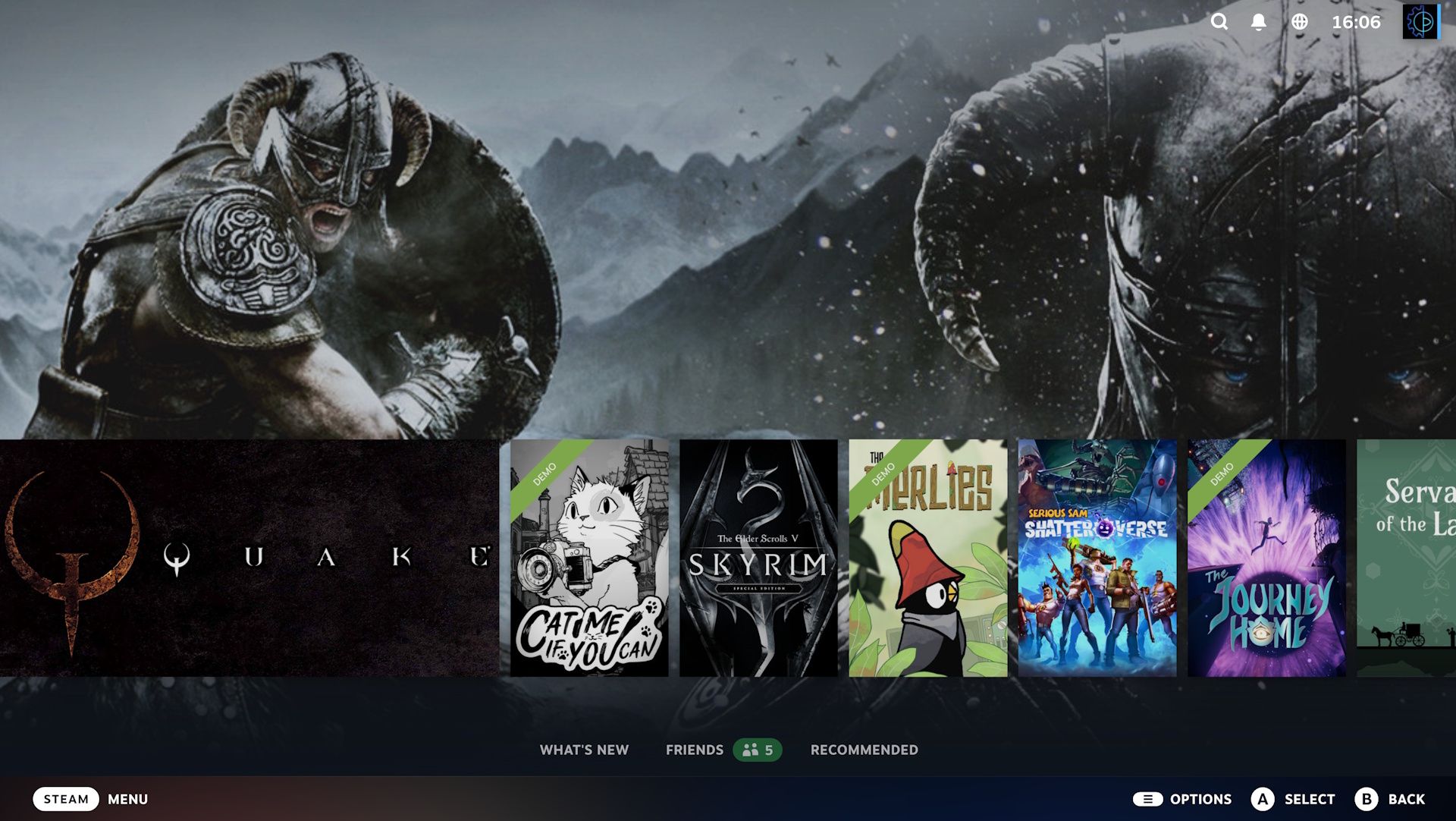
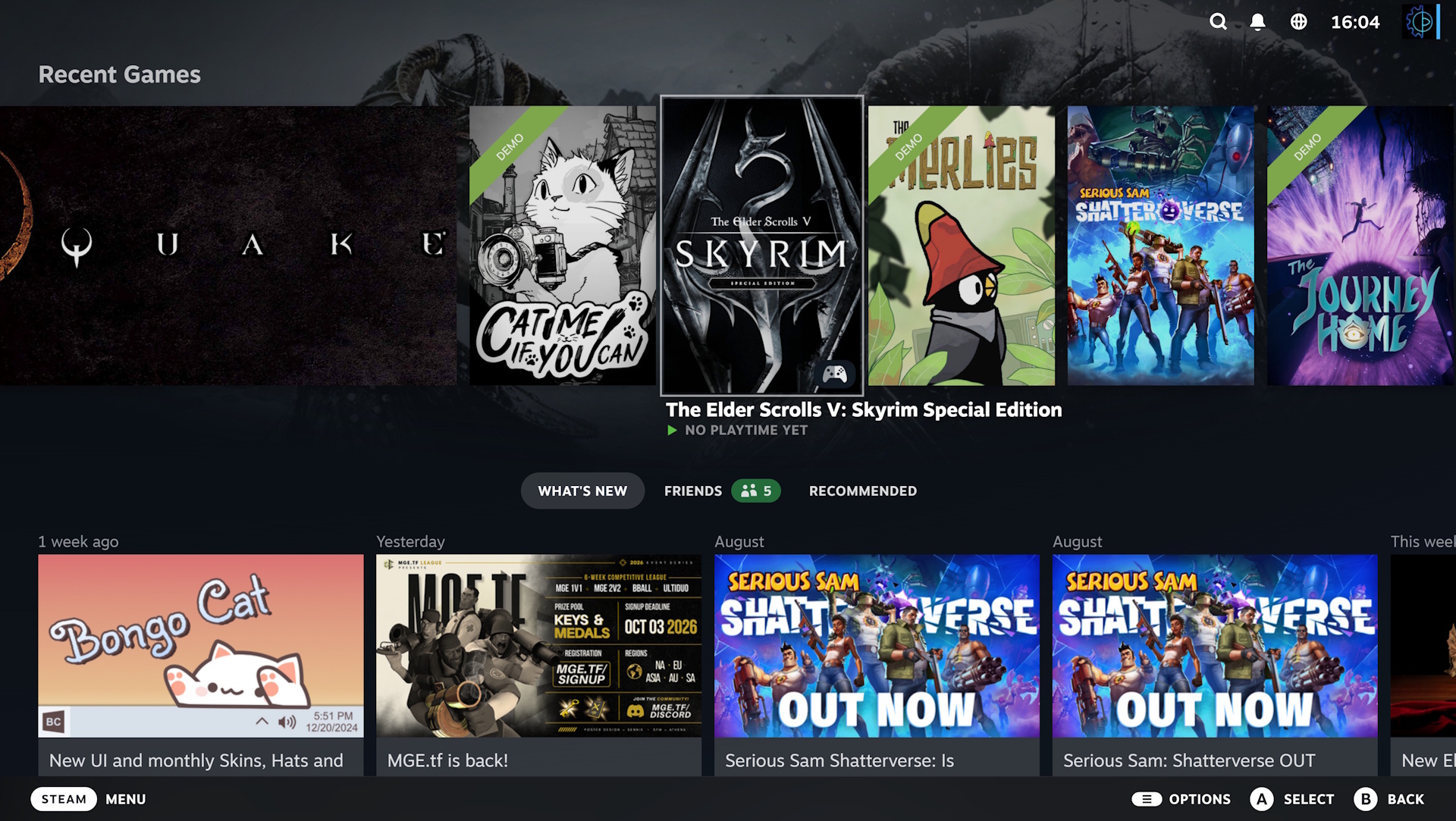
- Big Art Mode: This toggleable visual mode alters the layout of the Big Picture home screen. Instead of displaying a prominent, cluttered horizontal carousel of recently played games right in the center of the display, Big Art Mode drops the selection queue downward. When a user highlights a specific title, high-resolution hero art from that game dynamically splashes across the entire backdrop.
- Themed Screensavers: Big Picture Mode now features dedicated screensaving capabilities. Users can choose between a rotating slideshow of artwork from their recently played library (with or without personal user screenshots included) or a nostalgic, retro-inspired bouncing Steam logo that echoes the classic DVD player screensavers of the early 2000s.
- Performance Improvements: Beyond aesthetics, Valve has optimized startup performance for the Steam client globally. Furthermore, the update specifically reduces the performance overhead of Steam’s built-in game recording feature for Direct3D 12 titles on Windows.
- Platform Updates: The beta includes targeted improvements for Linux distributions, ensuring better overall stability across various operating systems.
Chronology: The Evolution of Steam’s Ten-Foot Interface
To understand the significance of "Big Art Mode," it is helpful to look back at how Valve has iterated on its ten-foot interface over the past decade.
2012–2022: The Original Big Picture Era
Valve first introduced Big Picture Mode in late 2012, aiming to bring the Steam catalog directly to living room television sets. While functional, the original interface was widely criticized for feeling clunky, slow, and overly reliant on a web-browser framework that struggled to match the fluid navigation of dedicated console dashboards like the Xbox or PlayStation menus.
February 2023: The Steam Deck UI Overhaul
When Valve launched the Steam Deck in 2022, it introduced a sleek, modern UI built on a modernized architecture. Recognizing the success and critical acclaim of this interface, Valve rolled out a massive update in February 2023 that completely replaced the legacy Big Picture Mode with the Steam Deck’s operating system framework. This unified the handheld experience with desktop PCs running the mode on TVs.
Late 2023–Present: Refinement and Personalization
Since standardizing the Steam Deck UI across desktop and portable hardware, user feedback has centered heavily on customization and visual flair. Players expressed a desire for a cleaner home screen that minimized text clutter and elevated the distinct visual branding of individual games. This community sentiment directly paved the way for the current development of Big Art Mode, which entered beta testing as the next logical step in interface personalization.
Supporting Data: Aesthetics vs. Usability
The introduction of Big Art Mode highlights an ongoing debate in software design: the balance between minimalist presentation and functional efficiency.
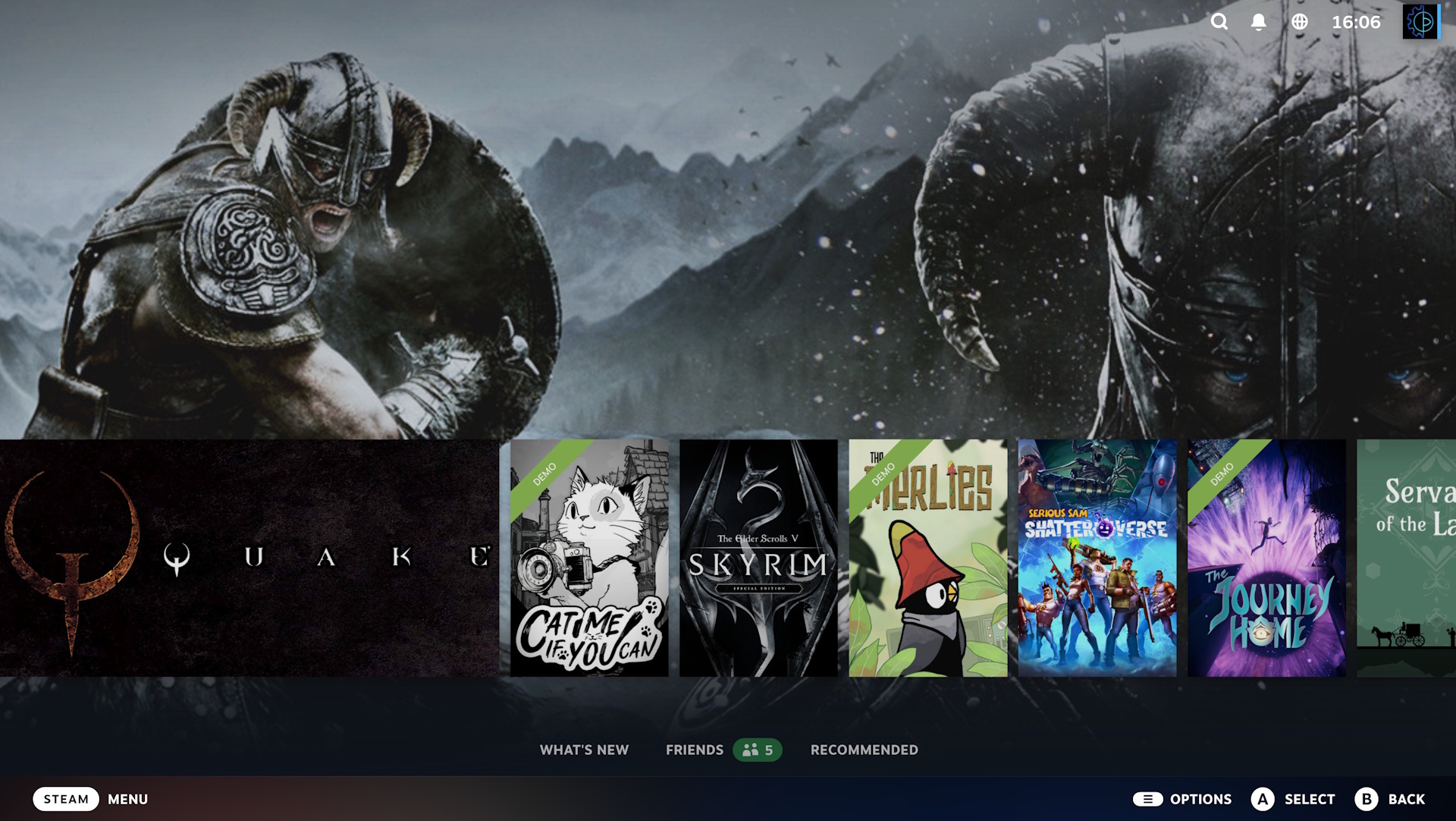
- Visual Real Estate: Traditional digital storefront libraries rely heavily on grids or dense carousels to display as many titles as possible simultaneously. By contrast, Big Art Mode embraces a "less is more" philosophy, dedicating up to 80% of the screen’s background to a single piece of hero artwork for the currently highlighted game.
- Accessibility of Content: Critics of minimalist UIs often worry that hiding secondary content behind extra scrolls or clicks degrades the user experience. Valve has addressed this by ensuring that all content present in the standard layout remains accessible; users simply need to scroll downward to access secondary menus, library filters, and friend activity feeds.
- Edge Cases: Early beta testers have noted that not all games translate perfectly to the new format. Titles with text-heavy or irregularly formatted promotional banners occasionally stretch or frame awkwardly against the dynamic backdrop, highlighting the challenge Valve faces in maintaining aesthetic consistency across millions of indie and AAA titles alike.
- Performance Metrics: On the technical side, preliminary reports from the beta indicate that the client startup optimizations yield measurable improvements, particularly on lower-powered hardware like the base Steam Deck and older living room HTPCs (Home Theater PCs). Additionally, mitigating the D3D12 recording penalty on Windows addresses a prominent community pain point regarding background utility overhead.
Official Responses and Community Feedback
Valve has maintained its characteristic transparency regarding the beta release, utilizing its official developer group and community news channels to outline patch notes and gather telemetry data.
While Valve has not issued a formal standalone press release regarding Big Art Mode—preferring to let the client notes speak for themselves—community reception across platforms like Reddit, Twitter/X, and the official Steam Discussions has been overwhelmingly positive.
- The Enthusiast Perspective: Couch gamers and desktop minimalists have praised the visual upgrade, frequently comparing it favorably to modern console dashboards. The inclusion of the bouncing retro logo screensaver has also struck a chord with nostalgic users, spawning numerous requests for customizable screensaver plugins and community-made animations.
- Cautious Optimism: Power users and developers of third-party plugins (such as Decky Loader components) have adopted a wait-and-see approach, noting that major UI overhauls in beta branches frequently require subsequent hotfixes to iron out compatibility quirks with custom themes and controller configurations.
Implications: What This Means for the Future of PC Gaming
The rollout of Big Art Mode—even in beta form—carries several broader implications for the PC gaming landscape.
1. Blurring the Line Between Console and PC
As living room PC setups become more common and handheld gaming PCs flood the market, software ecosystems must adapt. By continually refining its ten-foot interface, Valve is successfully positioning Steam as a viable, living-room-friendly alternative to traditional dedicated consoles like the PlayStation 5 and Xbox Series X. Gamers no longer have to sacrifice aesthetic polish or ease of navigation when moving their gaming sessions from a computer desk to a 4K television.
2. The Growing Importance of Metadata and Artwork
For developers, the update reinforces the commercial value of high-quality promotional artwork. In an ecosystem where storefront visibility is everything, games that feature striking hero art, clean logos, and dynamic background assets are inherently favored by interfaces that dynamically display those elements front and center. Developers may find themselves putting increased emphasis on their game’s Steam capsule and background assets to ensure their titles look stunning in modes like this.
3. Stability and the Path Forward
Because this feature is currently locked behind the Steam Client Beta, Valve has built-in safety nets allowing users to opt out instantly if they encounter bugs or prefer the legacy layout. However, given Valve’s track record of listening to beta feedback and swiftly implementing patches, Big Art Mode is expected to transition from the beta branch to the stable client release in the near future.
For now, players eager to test out the new visual fidelity can easily opt into the beta channel by navigating to the Settings > Interface menu within the Steam client, checking the client beta participation dropdown, and restarting their application. Whether you are gaming on a handheld while traveling or kicking back on the couch with a controller in hand, your Steam library is about to look a whole lot sharper.